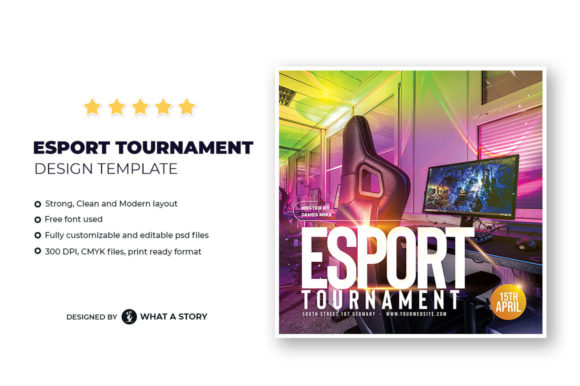
The Essential Tool for Your Tournament: Mastering the Esport Tournament Flyer Template
When you’re organizing a competitive gaming event, your first battle isn’t in the arena—it’s for attention. A compelling flyer is your primary weapon to attract players, sponsors, and spectators. While many organizers understand this, they often stumble at the execution, creating promotional materials that look amateurish or fail to communicate key details. This is where a professionally designed Esport Tournament Flyer Template becomes invaluable. It’s not just a pretty background; it’s a foundational tool that provides structure, ensures print-readiness, and saves you from the design pitfalls that can undermine your event’s perceived credibility.
Common Oversights When Choosing a Flyer Template
The biggest mistake is treating the template as a mere decorative image. You download a file, slap your text on it, and think you’re done. This approach misses the template’s true purpose: it’s a flexible system designed for adaptation. A common misunderstanding is focusing only on the aesthetic of the provided JPG preview. That preview is a finished example, not your starting canvas. The real power lies in the layered PSD file, which allows you to modify every individual element—from text boxes to background graphics—without damaging the underlying layout. Choosing a template based only on its JPG mock-up, without verifying it includes fully editable source files, is a critical error that limits your customization potential.
Another overlooked detail is the technical specifications. The mention of “4”x4” with Bleed Area” and “300 DPI, CMYK” isn’t jargon; it’s essential information for print quality. Using a template designed for digital use only, or one without proper bleed areas, can result in costly misprints where borders are cut off or colors appear dull and incorrect. Ensuring your chosen Esport Tournament Flyer Template is truly print-ready, with included bleed and trim guidelines, protects your budget and guarantees a professional final product.
Mistakes in Application and Customization
Even with a robust template, application errors happen. A frequent issue is overcrowding. The template offers a clean, modern layout, but some organizers try to fill every space with information, creating a cluttered, confusing flyer. Remember, the goal is communication, not data dumping. Prioritize the core details: event name, date, time, venue, game title, prize pool, and registration link. Use the template’s structured layers to guide your hierarchy.
Font substitution is another subtle mistake. The template uses specific free fonts to achieve its visual balance. Replacing them with default system fonts can drastically alter the flyer’s tone and professionalism. If you must change fonts, ensure you select alternatives that maintain a similar weight and style to preserve the layout’s integrity. Similarly, haphazard color changes can disrupt the visual cohesion. Modern esports flyers often use bold, contrasting colors to evoke energy. Altering colors without considering contrast and accessibility can make text hard to read or diminish the overall impact.
A Practical Approach to Effective Customization
Start by reviewing all included files. Open the PSD in your editing software and examine the layers. Identify which elements are meant for text, which are background graphics, and which are decorative. Before changing anything, duplicate the original PSD file to preserve a backup. Then, work methodically: update the largest, most prominent text (like the event headline) first, ensuring it’s concise and compelling. Next, fill in the crucial details in the designated info boxes. Use the provided guidelines to check your alignment. Finally, consider visual enhancements—perhaps replacing a generic game controller image with a logo of the specific game your tournament features, using the template’s layered structure to do so cleanly.
What to Verify Before You Download or Purchase
Don’t commit to a template based on a single image. Scrutinize the feature list. “Fully Layered, Customizable Editable Photoshop files” is a must. Confirm the dimensions are suitable for your distribution needs—can you “reduce and increase the size as per your requirement” without losing quality? A template reliant on raster graphics might not scale well. Check that the source includes instructions; a good template provides brief guidance on layer organization and font usage, smoothing your workflow.
Also, consider your own toolset. This Esport Tournament Flyer Template is a Photoshop (PSD) file. Do you have access to software that can properly edit layered PSDs, like Adobe Photoshop, Affinity Photo, or GIMP? If you only use basic image editors, you’ll be stuck with the static JPG, severely limiting your ability to customize. Investing in a template that matches your software capability is a foundational decision.
Leveraging the Template for Maximum Impact
Think beyond the physical flyer. The same design system can anchor your entire promotional campaign. Once your flyer is finalized, use elements from the layout to create consistent graphics for social media posts, forum announcements, and email invitations. This creates a recognizable visual identity for your tournament. The template isn’t a one-off product; it’s a brand kit for your event.
Finally, remember that a great flyer template solves design problems, but it doesn’t solve marketing problems. You must pair the professional visual with clear calls to action and strategic distribution. Place your flyers where your target players congregate: gaming cafes, relevant online communities, and social media groups. The Esport Tournament Flyer Template gives you the credibility to stand out in those spaces, but your outreach strategy puts that credibility to work.
By approaching the template as a modular system rather than a fixed image, verifying its technical specs, and applying its structure with disciplined customization, you transform a digital download into the cornerstone of a successful tournament launch. It allows you to present your event with the professional sharpness it deserves, attracting more serious participants and setting the stage for competition before the first match even begins.