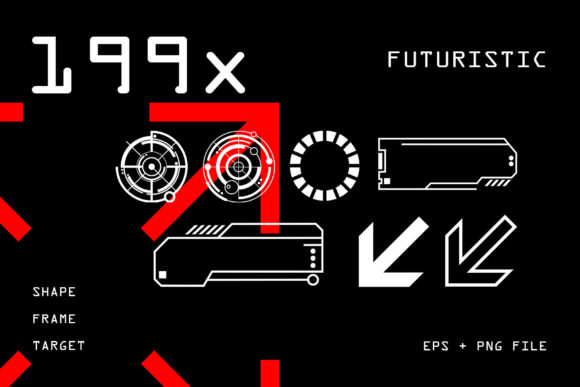
Evaluating a 199 Futuristic Graphic Element Collection for Designers
In contemporary digital design, a compelling visual aesthetic is not merely decorative; it is functional communication. The pervasive influence of virtual environments, gaming interfaces, and cinematic sci-fi has cultivated a widespread demand for visuals that feel advanced. For professionals tasked with creating this modern, technological look, sourcing appropriate assets can be a time-consuming bottleneck. A curated collection of 199 futuristic graphic elements addresses this specific need directly.
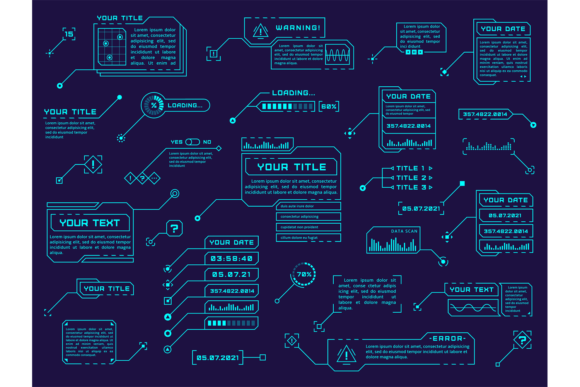
This collection is not a random assortment of icons. It is a systematic toolkit built around the core visual languages of digital and cyber design. The elements include HUD (Head-Up Display) components reminiscent of gaming interfaces, targeting reticules, abstract symbols, and various geometric icons. Their common thread is a deliberate aesthetic: clean, often luminous or layered, suggesting data, connectivity, and augmented reality. When you acquire a bundle of 199 futuristic graphic elements, you are investing in a vocabulary of shapes and forms designed to cohere visually.
The Practical Value of a Comprehensive Element Set
The primary strength of a large set like this is combinatorial flexibility. With 199 individual pieces, the possibilities for unique compositions multiply significantly. A designer can pull a HUD ring, combine it with a set of radial progress indicators, and overlay a subtle network symbol to create a complex background for a website's hero section. Because the elements share a foundational style, they integrate seamlessly with each other, reducing the design overhead of making disparate assets look unified.
The format offered—vector graphics—is a critical practical consideration. Vector files (typically EPS) are resolution-independent and infinitely scalable. This means a tiny symbol can be enlarged for a poster without loss of quality, or a complex element can be broken apart and its sub-components reused. For a professional workflow, this facilitates rapid customization: changing colors, adjusting line weights, or extracting specific parts to fit a precise layout requirement is straightforward in applications like Adobe Illustrator or Affinity Designer.
Application in Real-World Design Projects
The stated versatility of these 199 futuristic graphic elements holds up under realistic scrutiny. Their utility spans multiple formats and mediums.
- Digital Interface Design: The HUD and indicator elements are naturally suited for game UI, app dashboards, or interactive kiosk screens. They provide ready-made components that suggest functionality and interactive feedback.
- Print and Marketing Material: For a tech startup's event flyer or a cybersecurity conference poster, these elements can create an immediate thematic anchor. Arranged as borders, background textures, or focal points, they communicate the project's domain without explicit explanation.
- Web Design: Individual symbols can serve as custom icons for navigation or feature highlights. Groups of elements can be assembled into dynamic background patterns for sections of a website, enhancing the site's atmosphere without heavy video assets.
- Pattern and Texture Creation: As the description suggests, repeating and arranging smaller elements can generate unique, seamless textures. This is a particularly efficient use case for building custom backgrounds for presentations or video overlays.
The effectiveness of these elements hinges on their stylistic consistency. A collection that mixes overly detailed sci-fi art with simple flat icons would be jarring. A well-curated set maintains a consistent level of detail and a harmonious palette of forms, ensuring that any combination feels intentional.
Assessing Quality and Long-Term Utility
For a resource intended to expedite design work, reliability and quality are paramount. The vector format inherently supports quality in terms of technical execution—clean paths and scalable geometry. The artistic quality, however, depends on the original curation. A professional collection should exhibit attention to line consistency, balanced proportions, and thoughtful abstraction. Elements should look detailed enough to be interesting but not so ornate that they become unusable at smaller sizes or clash when combined.
The long-term value of a bundle of 199 futuristic graphic elements lies in its role as a persistent asset library. Unlike a template for a single project, a diverse element collection can be tapped repeatedly for different clients and purposes over years. As the "futuristic" aesthetic evolves, many of these core geometric and symbolic forms remain relevant, making the collection a durable resource. Its value compounds with use, as the designer builds familiarity and discovers novel combinations.
Who Benefits Most from This Resource?
This collection is optimally suited for designers and content creators who frequently operate within technology, gaming, innovation, or digital culture sectors.
- Freelance Graphic Designers: Those who need to rapidly pitch and execute designs for clients in tech industries will find this a time-saving base for concepts.
- Marketing Professionals and Small Business Owners: For creating branded materials for a tech product or service, these elements offer a way to achieve a sophisticated, industry-aligned look without requiring custom illustration from scratch.
- UI/UX Designers and Game Developers: The interface-specific elements provide tangible starting blocks for prototyping functional HUDs and interactive elements.
- Educators and Publishers: Creating educational content about future technologies, digital trends, or cybersecurity can be enhanced with visuals that immediately set the thematic tone.
It is less suitable for projects requiring a historical, organic, or highly ornate aesthetic. Its focus is unambiguously on the digital and cyber realm.
Professional Considerations and Limitations
Integrating a pre-made element collection requires a mindful approach to maintain originality. The risk is that overuse of the same popular assets can lead to visual homogeny across different designers' works. The professional tactic is to use these 199 futuristic graphic elements as foundational components, not final solutions. Customize colors aggressively, combine them with your own typography and photography, and modify the vector shapes to better fit your unique layout. This prevents your output from becoming generic.
A potential limitation is the static nature of the elements. While incredibly flexible in arrangement, they are not animated. For motion graphics or interactive video projects, these would serve as excellent starting points for assets that would then need to be animated in After Effects or a similar tool, adding another layer of work.
Finally, the sheer number—199 elements—is a benefit, but it demands organization. A professional will need to spend initial time categorizing the assets (HUDs, symbols, targets, etc.) within their own library system to ensure efficient retrieval later. Without this, the time-saving advantage can be diminished.
Ultimately, a well-executed collection of 199 futuristic graphic elements serves as a strategic shortcut. It translates a broad aesthetic trend into tangible, editable assets. For the target audience of working creatives and professionals, its value is measured not in its novelty, but in its practical integration into a real workflow, its ability to accelerate project development, and its enduring usefulness as a component library for the evolving visual language of technology.